The Garmin dezlCam OTR725 is a modern GPS truck navigator designed specifically for professional drivers. With its high-resolution 7-inch touchscreen, built-in 1080P HD dash camera, and advanced routing for large vehicles, this device positions itself as a practical solution for long-haul truckers who need clear navigation and added peace of mind on the road. As someone who depends on smart, dependable gear for efficient cross-country driving, I know how important the right truck GPS can be. The OTR725 aims to combine the reliability Garmin’s known for with truck-specific features all in one package.
My quick overview and rating of the Garmin dezlCam OTR725 are just below. Then, I’ll dig deeper and share everything I’ve found about this GPS truck navigator so you can see if it’s the right fit for your rig and route-planning needs.
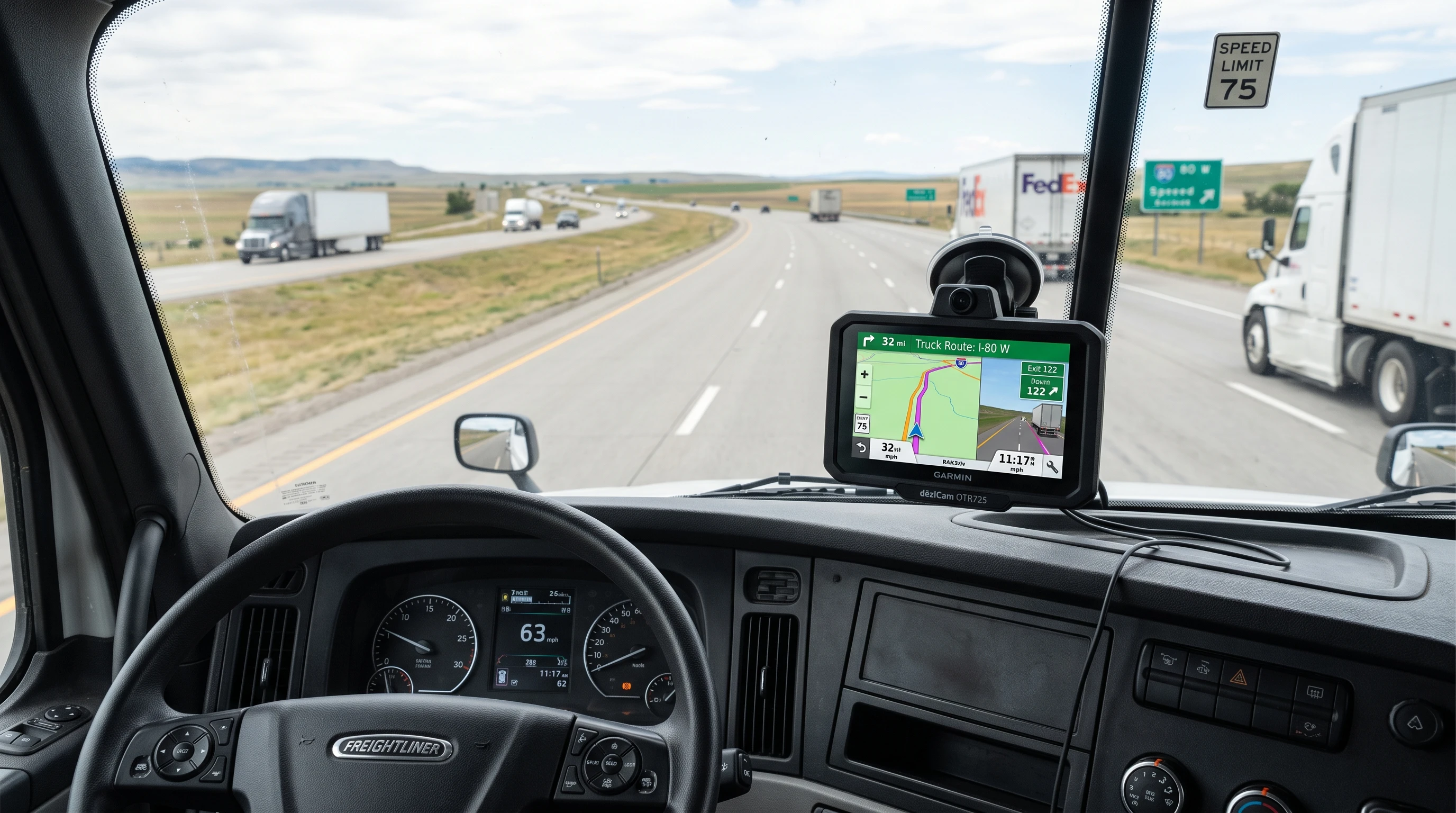
Product Name: Garmin dezlCam OTR725 High-Res 7” GPS Truck Navigator with Built-in 1080P HD Dash Cam
Main Website: Garmin dezlCam OTR725
Price: Varies by retailer, typically $599–$699 USD
Release Year: 2024
Screen Size: 7 inches, high-resolution touchscreen
Dash Cam: Built-in 1080p HD with advanced safety features
Custom Truck Routing: Yes (height, weight, length, hazardous material restrictions, and more)
Advanced Alerts: Yes (upcoming bridge heights, sharp curves, railway crossings, and more)
WiFi Updates: Yes
Bluetooth: Yes
Voice Assistant: Yes
Free Map Updates: Yes
Overall Rating: 4.7/5
User Reviews: 4.6/5 (across major online retailers in 2024)
Customer Support: 4.8/5
Traffic/Weather Integration: Yes
Live Fuel Prices: Yes
Truck Parking: Yes, with live availability
Alternative Models: dezl OTR710, OTR800, and OTR1010
Best For: Long-haul truck drivers, professional fleet managers, owner-operators, and anyone searching for a GPS truck navigator with dash cam features in 2026 and beyond
Free Trial: No direct trial, but Garmin offers a 30-day return window through authorized retailers, so you can try it risk-free if you buy from the right place.
Choosing the right GPS truck navigator for 2026 takes careful research. The dezlCam OTR725 is designed to cover everything a driver needs: clear mapping designed for large vehicles, reliable dash cam recording, and smart safety features. Both navigation and camera technology have been updated to address the latest challenges truckers face on today’s busy highways.
If you’re just starting as a long-haul driver or you’re searching for a major upgrade from a basic, outdated GPS, the OTR725 includes several thoughtful features that are easy to use and address real-world trucking problems.
About the Garmin dezlCam Series
My experience with Garmin goes back almost two decades. Before truck-specific devices were common, I spent years using standard automotive GPS units that couldn’t handle the demands of commercial transport. The dezlCam series changed the game for me. Garmin developed these units with a driver-first design, adding real trucker input along the way.
Garmin launched the first dezl truck GPS in the early 2010s. Since then, they’ve added bigger, clearer screens, more precise truck-specific routing, and, with the dezlCam models, a high-definition dash camera built right into the device. The OTR725 is Garmin’s answer to feedback from drivers who want both navigation and video recording in a single package, with all the truck-routing features you’d expect.
Garmin’s truck GPS team is based in the United States and Europe, and they regularly work with drivers and fleets to update their maps, live services, and safety alerts. This direct input has made their truck navigators much more in tune with real professional driving life than many generic options.
One thing I appreciate is Garmin’s willingness to keep its truck GPS line updated, both with map data and with truck routing changes that follow the latest regulations. The OTR725, released in 2024 and designed to be one of the top GPS truck navigators for 2026, continues that tradition. If you ever run into routing oddities or need updates to your routes, their customer support has a good reputation for following up with software patches or map database refreshes.
Who is the Garmin dezlCam OTR725 Made For?
The OTR725 is built with professional truckers and owner-operators in mind. It’s best for:
- Long-haul truck drivers covering North America, especially those dealing with hazardous materials or oversize loads
- Drivers who need a GPS truck navigator with a dash cam in one device
- Small and midsize fleets that want to keep tech as simple as possible while maintaining safety and compliance
- Owner-operators searching for the best truck GPS with continuous map and traffic updates
- Anyone who wants large-screen navigation with live parking, traffic, and fuel prices right on the dash
If you mostly drive local routes or in familiar, low-risk areas, or if you rarely need truck-specific routing features, then the OTR725 may be more than you need. But for long-haul routes, city deliveries, or frequent trips into new territories, the OTR725 earns its place in the cab.
Key Features of the Garmin dezlCam OTR725
Garmin has packed the OTR725 with a wide range of features designed for daily use in commercial driving. Here’s a closer look at what makes this GPS truck navigator with dash cam stand out:
High-Resolution 7-Inch Touchscreen
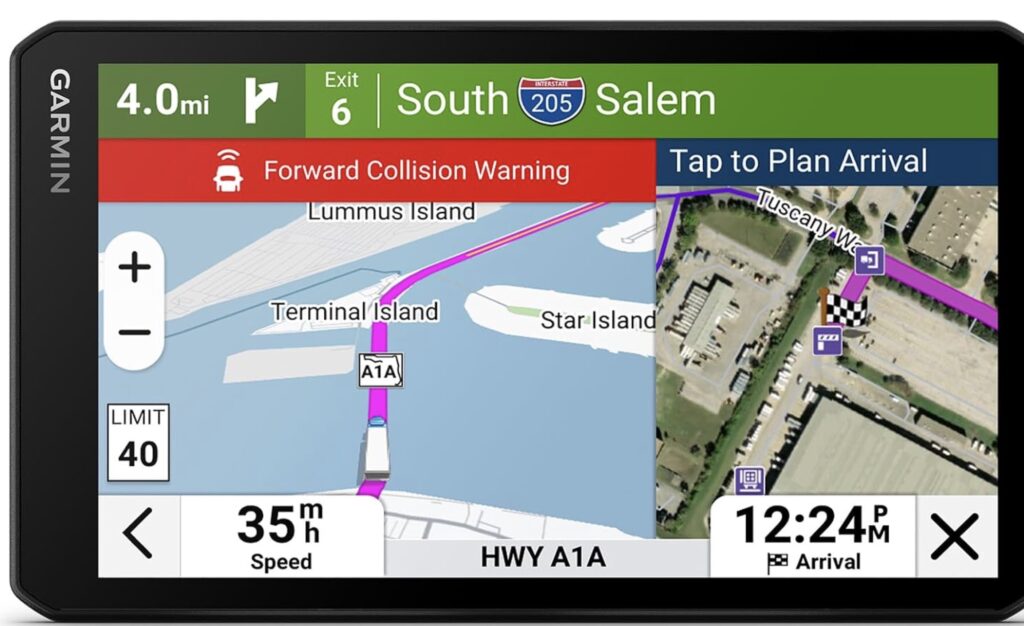
One of the simplest reasons I enjoy using the dezlCam OTR725 is the screen. The 7-inch high-res display is crisp and super easy to see, even in sunlight. For me, being able to quickly check a route, traffic alert, or parking option with a single glance makes navigation safer. The touchscreen is responsive with or without gloves, so I’m not stuck tapping multiple times while driving.
Custom Truck Routing by Size and Load Type
The OTR725 lets me enter my truck’s exact dimensions, including height, weight, length, axle limits, and even hazardous material status. Garmin’s routing engine then calculates a path that avoids low bridges, weight-restricted roads, sharp hairpins, or roads not suited for large commercial vehicles. This saves me lots of wasted miles and headaches finding out too late that a shortcut is impossible.
For fleets, you can store multiple truck profiles if more than one vehicle uses the OTR725. Drivers swapping into a new cab can load the right profile in about 30 seconds. It’s a nice touch that helps keep route planning consistent.
1080P HD Dash Cam Built-In
For me, this is the biggest jump from older GPS units. The built-in dash cam records full HD video with a wide viewing angle that covers most of the road ahead. The camera works automatically when the unit powers on, keeping a continuous loop unless I press one button to save a key event. This footage is invaluable for incident documentation, liability disputes, or for my own records when something goes wrong on the road.
Garmin also added a Gsensor so if I have a hard brake or get into an accident, the recording is automatically saved and protected from being overwritten. I can take quick still images at any time with one tap, which is especially useful at inspection sites or accident scenes.
Advanced Driver Alerts
Some features just make daily driving less stressful. The OTR725 gives me real-time alerts for:
- Bridge heights (with warnings if my rig is too tall)
- Sharp curves
- Steep grades
- Animal crossings
- Rest areas and service locations ahead
- Weight limits and seasonal restrictions
When I’m making a delivery near downtown or on an unfamiliar route at night, these alerts make all the difference. It helps me think ahead and avoid ugly surprises.
Live Traffic, Parking, and Fuel Price Updates
Through the dezl app and the builtin WiFi connection, I get access to live traffic conditions. I can see real-time congestion or detours on the route, along with truckfriendly parking availability ahead. This means I don’t spend half an hour circling busy lots when my driving hours are running out.
Another feature that saves me money is the live fuel price integration. The OTR725 highlights stops along my planned route and shows the latest prices, so I can plan fuelups based on cost or distance to an upcoming station. This has saved me quite a bit on my regular crossstate runs.
Free Map and Software Updates via WiFi
The unit updates itself over WiFi, either at home or at a truck stop. This keeps truck routing, POI databases, and camera firmware current for as long as I own the device. There’s no subscription charge for map updates, which is a relief compared to some competitor products.
Hands-Free Calling and Smart Notifications
With Bluetooth pairing, I can sync the OTR725 with my phone to make and receive calls hands free. I also see notifications on the screen, including texts and app alerts. I can focus on the road without picking up my phone every few minutes.
Voice Assistant for Driver Convenience
Garmin’s builtin voice assistant lets me search for addresses, add stops, or get parking info without touching the screen. Just start the voice prompt, ask for what you need (“Find truck stop near me” or “Add rest area stop”), and the navigator takes care of the rest. This is not only convenient but also helps keep my eyes where they belong, on the road.
Integration with ELD and Other Trucking Apps
The OTR725 can connect to Garmin’s suite of fleet and ELD accessories, including the dezl app, to help me track hours of service, shipments, and delivery check-ins. If your company is invested in Garmin tech for fleet tracking, this unit fits right in. The open accessory port also leaves room to add rearview cameras or expanded storage if needed.
Benefits of Using Garmin dezlCam OTR725 for Long-Haul Trucking
My daily experience (and that of plenty of other truckers I’ve heard from) shows that investing in a GPS unit designed for trucking is well worth it, especially if you spend hours and hours each week out on the highway. Here are some specific advantages I get from the OTR725:
- Reduces the risk of getting stuck on an improper road thanks to reliable, truck-appropriate routing
- Captures essential video evidence if there’s a traffic incident or dispute
- Saves time by offering live info on truck parking, traffic jams, and efficient detours
- Keeps compliance in mind (useful for drivers hauling hazardous materials or over-dimensional loads)
- Easy data transfer with WiFi and app connectivity, making updates painless
- Clear, glare-resistant display is always readable, even in bright sunlight
- Fewer distractions with hands-free calling and voice commands
How to Use the Garmin dezlCam OTR725: My Step-by-Step Approach
I grabbed my OTR725 right out of the box and had it running within ten minutes. Here’s my basic process for getting it ready for the road:
- Mount the device in my truck using the included suction cup. I usually pick a spot just below eye level but not blocking my view.
- Plug in the 12volt power adapter, and let the device start up.
- Go through the setup wizard, entering my truck’s exact length, width, height, and weight. If you move between trucks, create separate profiles for each.
- Connect the unit to WiFi to make sure the maps and software are up to date.
- Pair my smartphone via Bluetooth for calling, notifications, and internet-based live services.
- Check the dash cam feed on the display. Set the camera angle so it covers the full windshield without any dashboard reflections or obstructions.
- Adjust video recording settings and storage preferences if needed. I always enable Gsensor based event recording for extra peace of mind.
- Select my route, review upcoming rest stops or checkpoints, and hit the road.
Using the OTR725 becomes second nature. The menus are easy, the map interface is clean, and the quick camera snapshot button sits on the home screen. If I want to transfer video to my phone or a laptop for sharing, the microSD card slot makes it fast and easy.
Comparing Garmin dezlCam OTR725 with Other Top GPS Truck Navigators of 2026
With new GPS truck navigators released every year, I’ve put the OTR725 side by side with a few other 2026 contenders. Here’s how it stacks up to other big names:
Garmin OTR710 and OTR800
The OTR710 is a more basic 7inch model without a built-in dash camera, while the OTR800 moves up to an 8inch screen and sometimes includes an optional camera setup. If you want camera and navigation combined in one device, the OTR725 sits right in the sweet spot for size, screen quality, and price. Its dash cam is factory integrated, which saves space on your dash compared to running a separate camera and GPS unit.
Rand McNally OverDryve Pro
Rand McNally is a longtime competitor for Garmin in the trucking market. OverDryve Pro models often include a bigger display and built-in SiriusXM integration but can be less reliable in truck-specific routing. User reviews also mention less frequent map updates and sometimes slower performance. For drivers with prior Rand McNally devices, the Garmin interface feels faster and offers more support resources.
TomTom GO Expert Series
The TomTom GO Expert is another favorite for European and North American truckers. TomTom offers some unique traffic prediction algorithms and a sharp display, but the OTR725 wins for U.S. centric truck routing, faster map updates, and the built-in camera. If your main concern is dash cam reliability, Garmin’s seamless approach offers peace of mind and less cable clutter.
Older Models/Alternatives
If you’re considering alternatives, the older Garmin dezl 580, OTR700, and even the original dezlCam LMT have fewer live features and lack the advanced camera optics of the OTR725. In my experience, those units work fine but don’t have the up-to-date truck parking and hazard alerts that have become super important for modern trucking routes.
Why Choose a GPS Truck Navigator with a Built-In Dash Cam?
I used to think that a separate dash cam was all I needed. But running both a dash cam and a GPS often meant stubborn cables, conflicting software, or missed footage when one battery died. With the OTR725, the dash cam is hardwired into the same high-quality battery and GPS interface, all controlled from the same touchscreen.
A built-in dash cam helps by:
- Reducing dashboard clutter. The screen serves a dual purpose for both video and navigation.
- Ensuring the video is always rolling when I start the truck.
- Making it easy to review, save, or share footage directly from the main screen or with the Garmin app.
- Supporting automatic event detection, so even if I’m focused on the road, the camera saves footage of hard braking, collisions, or sudden movements.
If you’re worried about privacy or want to limit recording in certain situations, the device lets you pause recording or protect files easily, right from the main touchscreen or using a companion app.
Extra Features for Truck Drivers in 2026 (and Beyond)
As the transport industry continues to evolve, Garmin continues to update its firmware based on real-world feedback. In 2026, the OTR725 is expected to receive:
- Enhanced live weather tracking with dynamic rerouting based on road conditions
- Smart notifications when parking lots approach full occupancy
- Expanded database of weigh stations and inspection facilities
- Improved integration with third-party ELD and fleet management software
Garmin routinely posts firmware update announcements on its support page. Keeping your device up to date means you’ll have access to new features as they’re released, usually several times per year. Updates happen over WiFi, and you get a notification right on the unit when a new feature is ready.
Common Questions About the Garmin dezlCam OTR725
How secure is my video footage?
Video files are stored on a replaceable microSD card, encrypted, and only accessible with the right device or Garmin app. If the camera detects an accident or a major jolt, key footage is automatically saved and won’t be overwritten. I can also back up files to my phone or computer for long-term storage or sharing with insurance providers.
Is live traffic coverage available everywhere?
Live traffic coverage depends on cellular and internet access, usually through your smartphone’s connection and the Dezl app. In most metro areas across North America (and on main highways), live updates work smoothly. There may be occasional gaps in very rural stretches without any cell signal, but the built-in map routing still works offline.
Can I use it outside North America?
The standard model comes loaded with North America maps, but optional maps for Europe or Australia/New Zealand are available from Garmin. Be sure to select the right model or map set for your planned regions.
How do I keep map data up to date?
Just connect the OTR725 to WiFi at home, in the terminal, or, at most, at truck stops. The update process is automatic. You can schedule updates to run overnight or when you’re off duty, so the device is always ready for the next adventure.
Can I record only when driving?
Yes. The dash cam starts recording when you power up your truck or turn the ignition on. There are power settings to limit recording to only when the truck is active, which helps preserve storage space and keep your privacy intact during downtime.
Building Authority on the Road: The Value of a Reliable GPS Truck Navigator
I’ve seen firsthand how big a difference a high-quality GPS truck navigator can make, not just in getting from point A to point B, but in maintaining professionalism, legal compliance, and safety. Law enforcement and fleet compliance officers are getting stricter about truck routes, hours of service, and digital records. Having a modern navigator like the dezlCam OTR725, with a built-in dash cam and real-time alerts, helps me stay on top of all those requirements.
- Better navigation means I avoid fines and delays from wrong turns or breakdowns on restricted roads.
- Instant video evidence helps protect me against false claims if an incident occurs.
- Advanced alerts and live traffic cut stress and help me stick to my time windows.
- Being able to quickly verify the availability of truck parking or fueling stations means fewer rushed schedule changes.
If you drive for yourself or want to build your reputation as a reliable driver, having a tool like the OTR725 really does make a difference. Dispatchers and customers notice drivers who consistently deliver on time and can back up their logs with digital proof.
Tips for Getting the Most Out of Your Garmin dezlCam OTR725
After hundreds of hours using this navigator, I have a few personal tips:
- Set up your truck profile as soon as you get the device. Double-check every value and update after modifications or new loads.
- Connect to WiFi once a week (or more) to download the latest maps, traffic alerts, and safety data.
- Mount the camera lens cleanly, away from dashboard glare or hanging air fresheners, to keep the video clear in all conditions.
- Use a high-quality microSD card with at least 64 GB of capacity to provide plenty of recording space.
- Pair your phone with the device for the full range of live features, including weather and traffic updates.
- Bookmark your regular stops, company yards, and fuel stations to speed up route planning each morning.
Staying proactive with new updates and profile adjustments will keep your routes safe as road conditions, regulations, and GPS maps glow up.
Community and Support: Learning from Fellow Drivers
The best tips I’ve picked up about using the OTR725 have come from truckers and fleet operators just like me. Garmin maintains a lively online community in its forums, where drivers exchange route ideas, software tweaks, and troubleshooting tips. I regularly check there for the latest firmware changes and creative solutions to common road problems.
Garmin’s customer support has also helped me several times, especially after map changes, with hardware questions, or when I’m trying out new accessories. Most questions are answered within a day. For those who prefer in-person help, Garmin has nationwide repair and service centers that can handle warranty claims, repairs, and technical checks. Backup and troubleshooting resources are available on their website 24/7. That’s a benefit you don’t always get from smaller brands.
Choosing the Right GPS Truck Navigator: What to Look For in 2026
If you’re searching for the best GPS truck navigator for 2026, keep these points in mind:
- Does it support custom profiles for your exact vehicle dimensions and load types?
- Are live features (traffic, parking, fuel prices) included, and how reliable are they near your regular routes?
- Is the screen large, bright, and responsive enough to handle quick glances while driving?
- Does the dash cam offer at least 1080P HD quality, and are recordings saved securely with easy export options?
- How easy is it to update maps and software? WiFi-only updates can be a big advantage over having to plug in a cable or pay for extra software.
- What kind of support, warranty, and documentation is offered? Larger brands like Garmin tend to have more resources if you run into an issue on the road.
The OTR725 checks all these boxes and has already earned strong ratings from owner-operators and major fleets in 2024. My day-to-day experience backs that up. No single device is perfect, but Garmin’s heavy investment in map coverage, regular updates, and support for U.S. regulations keeps it a leader.
Cost and Value: Is the Garmin dezlCam OTR725 Worth It?
With a typical retail price between $599 and $699, the OTR725 is a big but reasonable investment compared to outdated devices or relying on a generic smartphone app. The built-in dash cam adds a layer of protection that easily pays for itself if you ever face an insurance claim or legal issue on the road.
For drivers who want something simpler or on a tighter budget, Garmin’s OTR710 or OTR700 offers many core features at a lower price but skips the dash camera. For those with a serious need for extra-large screens, the OTR1010 has a 10inch display, but it’s more expensive and may be too large for some cabs.
Some fleets offer purchase discounts or group-buy options, so check with your company or Garmin dealers. Because updates and map data are free for the life of the device, the long-term costs are limited to media cards and occasional accessories.
Are There Any Drawbacks?
No GPS truck navigator is perfect. While I’m a fan of the OTR725, here are a few downsides that might matter, depending on your situation:
- The price is higher than that of entry-level units. Drivers on a tight budget may need to consider earlier models or forgo dash cam functionality.
- The built-in dash cam, while very reliable, can’t be positioned elsewhere. Some drivers prefer a wide-angle camera mounted higher or more discreetly.
- Voice assistant features depend on clear voice recognition. Cab noise or a heavy accent sometimes means you need to repeat a command.
- The screen, while bright, is more prone to smudges than older matte models. I keep a microfiber cloth handy.
- No free trial, though retailers with generous return policies make it possible to try it out risk-free if you buy through a reputable source.
Alternatives to the Garmin dezlCam OTR725
If you’re still weighing options, here are a few GPS truck navigators to consider as alternatives:
- Garmin OTR710 and OTR800: Slightly less expensive, they offer most features except the built-in dash cam.
- Rand McNally OverDryve Pro: 8inch screen with integrated SiriusXM support, slightly less frequent software updates.
- TomTom GO Expert: Strong routing engine, especially in Europe, but fewer U.S.-focused features and a separate dash cam required.
- Older Garmin Dezl 580 or OTR700 models: Budget-friendly and offer solid routing, but lack some live features and the newest camera tech.
Be honest about what you need day in, day out. If you handle mostly small, regional hauls or don’t need dash cam evidence, you can save money with a basic model. For anyone focused on safety, convenience, and live data, the OTR725 rises to the top of the list.
Final Thoughts: My Take on the Garmin dezlCam OTR725 High-Res 7” GPS Truck Navigator
The dezlCam OTR725 stands out as a GPS truck navigator that blends top navigation features with a practical dash cam. Having used plenty of truck GPS setups over the years, including those from Rand McNally, TomTom, and generic brands, I keep coming back to Garmin for its dependable live features, screen quality, and real-world support for drivers like me.
From the first drive with the OTR725 on my dash, I noticed a drop in stress and route confusion, and less time wasted hunting for parking. The built-in camera has already come in handy, giving me quick, documented proof during an insurance claim that could have become much messier. Live fuel pricing and truck parking data are other bonuses that not only save money but also create fewer headaches when I’m pushing up against my driving hours or running behind schedule.
As a long-haul professional, I don’t take tech upgrades lightly. I need equipment that’s reliable, easy to manage, and delivers a real benefit over just using my phone or an old basic GPS. The Garmin dezlCam OTR725 wins on those fronts, making it my top recommendation for anyone seeking the best GPS truck navigator with dash cam features for 2026 and beyond. If you’re ready to take the hassle out of your next load, this unit is a move you won’t regret.
Questions or want to share your own experience with truck GPS devices? I’m happy to help or swap stories in the comments below.
This article was created with AI assistance and reviewed by a human editor.
About The Author