Electronic Chart Display and Information Systems (ECDIS) are changing how I approach navigation at sea. With a focus on Electronic Chart Display trends for 2026, I find that more vessels and training centers are adopting these systems for the efficiency and safety they offer. Understanding how ECDIS works is really important for anyone working with modern marine navigation, whether you’re new to the field or looking to update your skills.
What Is ECDIS and Why Is It Important?
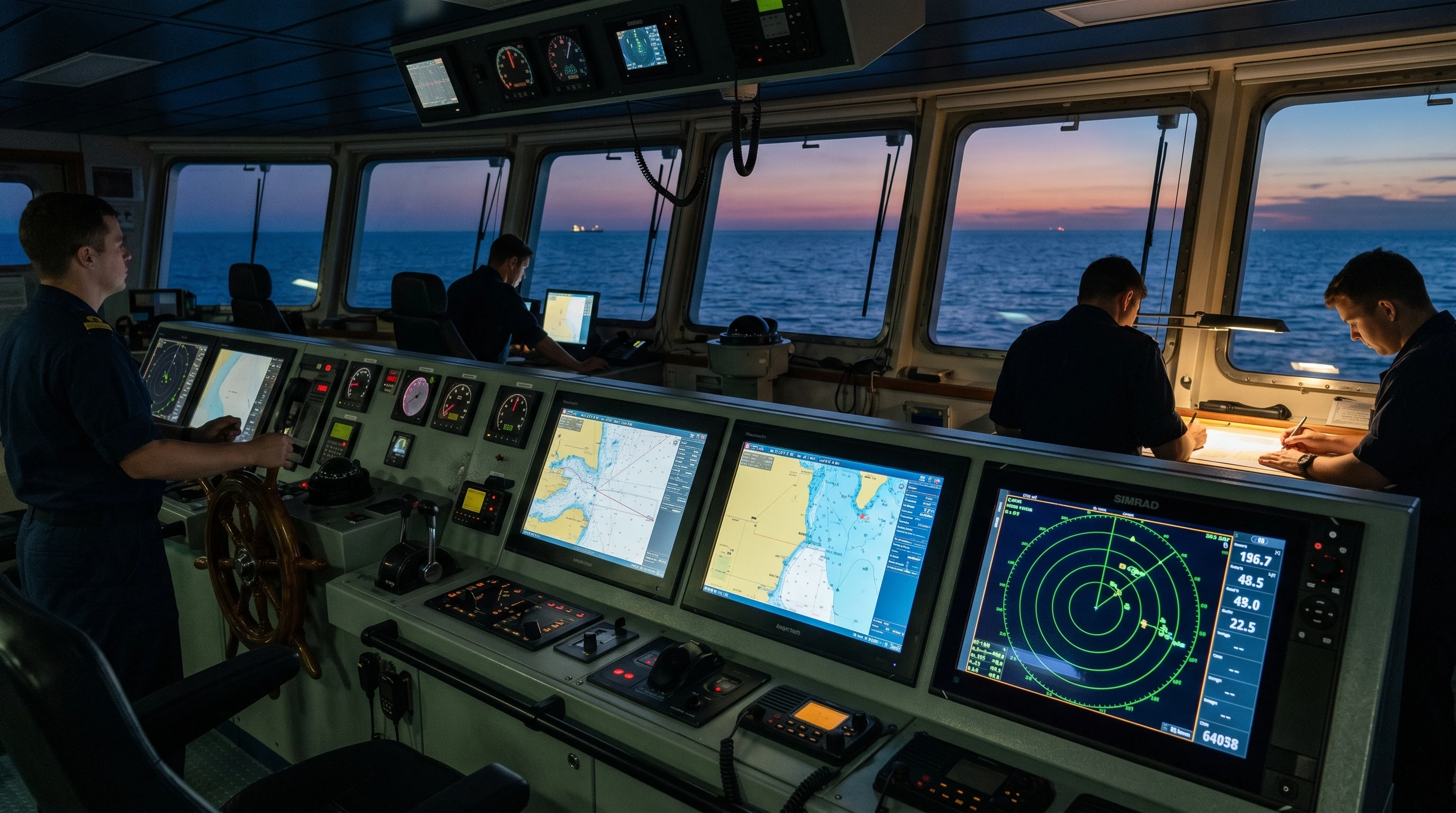
ECDIS stands for Electronic Chart Display and Information System. It’s a computerized navigation system that uses digital nautical charts to display a ship’s position, route, and other navigational details in real time. The International Maritime Organization (IMO) requires certain ships to use ECDIS as the primary means of navigation. Because I rely on fast, accurate chart updates and improved situational awareness, ECDIS has become a must-have on most commercial vessels.
Unlike paper charts, ECDIS makes route planning and monitoring easier, reduces the risk of human error, and enables quick adjustments based on the latest available data. The system integrates data from sources such as GPS, radar, AIS (Automatic Identification System), and sensors, helping me see the vessel’s current location, potential hazards, and changing weather conditions all at once.
On top of these core benefits, ECDIS can store vast amounts of navigation data, so that as regulations evolve and sea routes become more crowded, vessels using ECDIS can respond and adapt more quickly than ever before. That real-time flexibility contributes to improved fleet coordination and safety on busy waters.
Key Features of an Electronic Chart Display System
The Electronic Chart Display system features are built to help me keep navigation safe and efficient. Here are some of the main ones I work with regularly:
- Real-Time Positioning: ECDIS uses GPS and other inputs to update my vessel’s location instantly on the digital chart.
- Route Planning and Monitoring: I can plot intended routes, check for safety hazards such as shallow water, and make changes on the go.
- Alerts and Warnings: The system gives visual and audio alerts if I approach danger zones or deviate from my planned route.
- Integrated Information: ECDIS brings together radar, AIS, weather data, and depth sounders, helping me get a complete picture.
- Chart Updates: Chart updates are now mostly automatic, so I always have access to the latest navigational information.
These features mean I spend less time poring over paper charts and more time watching for real risks as they appear. Additional features found in newer ECDIS models include enhanced simulation modes for practicing emergency maneuvers and the capacity to store digital logbooks that automatically capture all navigation data. This boosts compliance with shipping regulations while making daily record-keeping easier for officers.
How to Use Electronic Chart Display: The Basics
When I first started using ECDIS, I focused on a few core tasks. Here’s how I recommend getting started if you’re new:
- Chart Loading: Begin by loading electronic navigational charts (ENCs) for your area. Ensuring you have up-to-date charts makes a real difference.
- Setting Up: Familiarize yourself with the system interface. Learn how to zoom, pan, and toggle chart layers.
- Position Checking: Confirm that the system shows your vessel’s current GPS position accurately. Cross-check with manual fixes at first for peace of mind.
- Route Plotting: Plot your intended route point by point. The system will automatically check the route against known hazards.
- Monitoring Progress: As you sail, use the progress monitor to see whether you stay on your route, and respond promptly to any alerts.
Understanding these essentials is a great first step toward comfortable ECDIS use. As your skills improve, you’ll work more efficiently and with more confidence. Don’t forget to regularly back up navigation data and logs to secure storage. This ensures you have access to crucial records, especially during port inspections or after close calls at sea.
Advantages of ECDIS in Navigation
There are several advantages of ECDIS in navigation that really stand out for me:
- Improved Safety: Automatic alerts and real-time information reduce the risk of running aground or colliding with other vessels.
- Efficiency: Route planning is faster, and updating charts no longer means waiting for physical copies or making manual corrections.
- Situational Awareness: Integrated data helps me understand everything around my vessel at a glance.
- Environmental Protection: I can easily avoid sensitive areas using up-to-date environmental data, and automated logs simplify compliance.
These benefits help my crew and me focus on safe, effective travel and free up time for other duties. It’s also important to note that with ECDIS, voyage planning can be tailored to current weather conditions and traffic, thereby improving energy efficiency and reducing operational costs over the vessel’s lifetime.
Common Challenges and How to Overcome Them
Even though ECDIS brings many benefits, it comes with a learning curve and potential pitfalls. I’ve faced a few, and here’s what I recommend looking out for:
- Over-Reliance: It’s easy to trust ECDIS without question, but cross-checking with paper charts and manual fixes remains really important.
- System Errors: Electronic systems can glitch, freeze, or experience sensor failures. Regularly verifying connections and having backup procedures in place can prevent bigger problems.
- Interface Differences: Not all ECDIS software looks or behaves the same. Get familiar with your vessel’s specific make and model before sailing.
- Updates: Automatic chart updates are great, but a missing update can leave you with an outdated chart. I always check update status before departure.
Ongoing practice, regular technical checks, and a strong foundation in basic navigation skills help avoid most trouble spots.
System Reliability
ECDIS can become less helpful if it’s not regularly checked and maintained. I always schedule routine system diagnostics and practice switching quickly between primary and backup navigation methods. Knowing that any system can fail, I make it a priority to keep my traditional navigation skills sharp. Regular drills and team debriefs also keep everyone aware of procedures in the event of an ECDIS malfunction without warning.
User Training and Familiarity
The best ECDIS doesn’t help much if I don’t know how to use it well. Taking part in online ECDIS training courses allowed me to practice in a risk-free environment and learn new features as the software is updated. Interactive simulators and hands-on sessions have made a big difference for my day-to-day operations. Staying current with training is a real advantage. Some companies even encourage ongoing peer instruction to build crew confidence, especially as ECDIS interfaces evolve over time.
Advanced ECDIS Tips
As I became more comfortable with ECDIS, I found that digging into advanced features made navigation even smoother. Here’s what I focus on now:
- Layer Customization: Adjusting which chart information is shown helps me keep the display readable in busy areas. Turning off less important data when cruising, then turning it back on before docking, keeps things clear without distractions.
- Alarm Management: ECDIS includes customizable alarms for shallow water, proximity to navigational aids, and off-route deviations. Setting these carefully prevents alarm fatigue and keeps key warnings front and center.
- Usage Logs: Automatic logs from ECDIS simplify compliance with voyage data recording requirements. Reviewing these logs after trips makes it easier for me to prepare reports and look for trends.
Practicing with these tools, I’ve noticed my workflow getting smoother and safer. It’s also helpful to experiment with different display color schemes based on ambient light conditions. This reduces eye strain and improves focus during long shifts or when navigating in tricky weather.
Choosing the Right ECDIS for Your Vessel
Telling apart ECDIS options can feel overwhelming at first. When I size up new systems, here’s what matters to me:
- Compatibility: The ECDIS must work smoothly with the existing bridge equipment, such as radar and GPS.
- User Interface: Simplicity and clarity in controls are a big plus for fast reaction and learning by all crew members.
- Support and Updates: Good customer support and regular software updates keep the system reliable and extend its working life.
- Cost and Licensing: Clear information on both upfront costs and ongoing licensing or service fees helps me make a realistic budget for my ship.
Looking up ECDIS software review 2026 articles and comparing user feedback provides extra help before making a final decision. It’s a good idea to get trial versions or demos when possible. That way, everyone on the team can test usability and interact with key features before committing to a purchase.
Choosing and Completing ECDIS Training Courses Online
Learning to use ECDIS is now more accessible than ever. ECDIS training courses online range from beginner to advanced, often using real-time simulations. The courses I’ve found most helpful offer:
- International standards (like IMO Model Course 1.27) for certification
- Self-paced modules covering both basics and advanced functions
- Scenario-based exercises reflecting true onboard situations
- Interactive elements, so I can practice responding to chart changes, alerts, and failures
Choosing a course recognized by maritime authorities gives me confidence that the training will be accepted by employers and inspectors. Repeating segments and reviewing test questions help keep my skills fresh for real-world use. Don’t overlook ongoing refresher courses, especially as software updates introduce new features or as regulations change.
Real-World Benefits: How ECDIS Impacts Daily Navigation
Having a reliable ECDIS set up changes how I handle navigation. On long voyages, fatigue sometimes sets in, but ECDIS keeps vital information front and center without endless manual calculations. When crossing busy waters or entering ports with heavy traffic, the integration of AIS data helps me spot and track other vessels with greater confidence.
On a trip across the English Channel, for example, ECDIS made checking for traffic separation zones and identifying restricted areas much easier than if I had to flip through thick chart folios. The automated warnings and clear visuals helped me keep a safe course, even in heavy fog with low visibility. Additionally, the system’s ability to instantly recalculate my route in response to closed areas or changing depths reduces stress and supports compliance with rapidly updated notices from maritime authorities.
Frequently Asked Questions About ECDIS
If you’re getting started or trying to troubleshoot ECDIS, here are answers to common questions I’ve received from colleagues:
Question: What’s the difference between ECDIS and a regular chart plotter?
Answer: ECDIS meets international standards, supports official chart types (like ENCs), and can legally replace paper charts on many vessels. Chart plotters are often less advanced and typically used for recreational boating or as backup systems.
Question: How often do digital charts update, and do I have to do anything to keep them current?
Answer: Many ECDIS systems update charts automatically using online downloads. Still, I check update logs before sailing to confirm I have the latest information. Some older systems need manual loading via USB or CD.
Question: Are paper charts still required after installing ECDIS?
Answer: In many cases, ECDIS with up-to-date ENCs replaces paper charts, but specific flag states or company policies may require paper backups or at least a secondary ECDIS unit.
Question: What should I do if the ECDIS system fails during navigation?
Answer: Always keep familiar with manual navigation, check your backup systems, and refer to paper charts if ECDIS isn’t available. Some vessels carry a secondary independent ECDIS that you can switch to if the main unit fails.
Future of Electronic Chart Display Technology
Looking ahead, the future of Electronic Chart Display technology holds lots of promise. Better satellite coverage, faster processors, and more integration with new types of sensors are coming soon. More manufacturers are making ECDIS easier to use on touchscreens and adding automation for chart updates and passage planning. Data sharing between vessels and shore stations is also growing, making navigation safer and faster even in remote waters.
Current Electronic Chart Display trends for 2026 indicate a move toward cloud-based updates, wider use of AI-powered routing suggestions, and even virtual reality features that could one day help bridge the gap between crews and training through real-time simulation overlays. We may even see voice command interfaces and mobile device integration to further support busy crews on the go.
Learning to use ECDIS and keeping up with new features are now routine parts of my work. The combination of safety, efficiency, and convenience it brings has made it an essential tool for any professional mariner or navigation officer. As technology moves forward, embracing these changes ensures crews stay ahead of regulatory requirements and adapt quickly to shifts in global maritime operations.
This article was created with AI assistance and reviewed by a human editor.
About The Author