Lowrance marine GPS innovations have shaped the way I experience time on the water.
Whether I’m fishing, sailing, or exploring new coastlines, using top quality marine navigation systems gives me more confidence when the weather or water gets unpredictable. Picking marine GPS gear from Lowrance means getting access to features that are practical, intuitive, and reliable for a range of marine activities. Here, I’m sharing what makes Lowrance GPS technology advancements so useful, the core features to look for, how to use these systems effectively, and what you might want to consider before making a purchase.
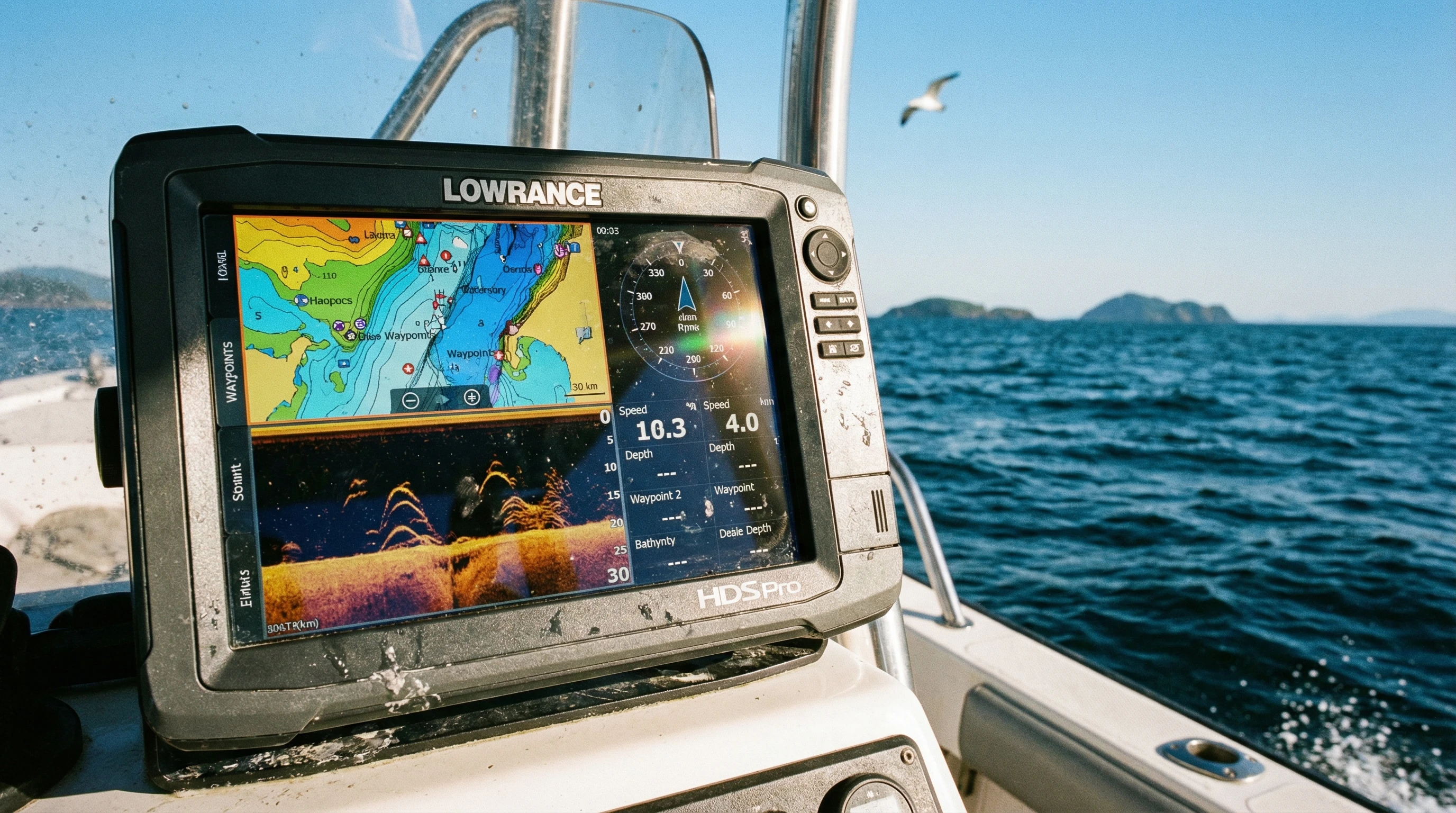
How Lowrance Marine GPS Innovations Transform Navigation on the Water
Lowrance has a long track record of producing marine electronics that help both beginners and experienced mariners. The company’s history goes back over 60 years. Today, I see Lowrance systems on everything from small fishing boats to adventurous ocean cruisers. Modern Lowrance GPS technology advancements have made it easier than ever to safely navigate rivers, lakes, and coastlines.
Advanced electronics like chart plotting, touchscreen displays, high frequency CHIRP sonar, and easy to use route planning tools change what’s possible for recreational boaters and anglers. Instead of second-guessing my location, I can get instant, reliable position data and steer through confidently, even in low visibility conditions.
Lowrance marine navigation systems come in different sizes and price points. That means there are simple options for small crafts and super detailed multifunction devices for large yachts or commercial fishing vessels. This flexibility means that, regardless of budget or experience, I can find something that fits my needs and helps me use the water more safely and efficiently.
Key GPS Technology Advancements from Lowrance
Lowrance GPS technology advancements aren’t just about accuracy. They also serve up impressive tools designed to make my outings smoother and my decision making easier. Some of the most popular GPS improvements I’ve seen from Lowrance include:
- High-definition touchscreens: Bright, sunlight readable screens allow easy map reading and waypoint entry. Responsive touch controls make route planning and system settings as simple as using a mobile phone.
- Integrated CHIRP sonar: By sending continuous pulses of sonar, CHIRP helps me see bottom features and fish arches with incredible clarity, even at high speeds or in deep water.
- DownScan and SideScan Imaging: I rely on these sonar imaging tools to get nearly photo-like images of what’s below and beside my boat, making structure and fish easier to pinpoint than with traditional sonar.
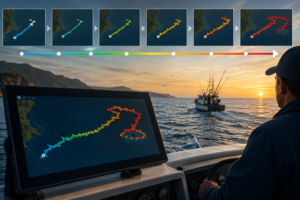
- Genesis Live mapping: This feature allows me to build my own high-detail contour maps in real time by driving around an unexplored lake or unfamiliar bayou.
- ActiveTarget Live Sonar: For advanced users, ActiveTarget provides real time views of fish and structure as they move, which is especially useful when fishing in changing conditions.
Each of these GPS innovations aims to give me clearer, more timely information right at my fingertips. That way, whether I’m tracking tides, dropping anchor, or finding a new fishing spot, I’m not relying on guesswork.
How to Use Lowrance GPS Effectively, Practical Tips for Every Outing
Getting the most from Lowrance marine navigation systems starts with understanding the basics and setting up my device for the way I use my boat. Here are some tips I’ve found helpful for running Lowrance GPS gear effectively:
- Customize home screens: Organize sonar, charts, and gauges for quick access. I set up shortcut buttons for the menus I use most, so important info is never far away.
- Update software regularly: Lowrance releases firmware updates that keep maps and features accurate. Connecting to Wi Fi or using a microSD card makes this process pretty easy.
- Save waypoints and trails: Dropping waypoints helps me remember favorite fishing spots, safe anchorages, or tricky channels. Trails let me retrace my route if the weather changes.
- Sync with mobile apps: Some Lowrance units let me sync with my phone or tablet for sharing waypoints, maps, and even weather updates directly.
- Set alarms and alerts: Depth alarms and anchor drag alarms give me another layer of safety, especially when I’m anchoring overnight or boating alone.
Learning to use all these features takes some practice, but I started by setting up simple routes and home screens, then worked my way into more advanced settings as I became comfortable. The good news is that Lowrance provides clear manuals, video guides, and a strong user community, so if I get stuck, help isn’t hard to find.
Top Features of Lowrance GPS Explained with Real World Examples
When I’m out on the water, several Lowrance marine GPS innovations stand out. I appreciate technology that saves me time, reduces stress, and adds more fun to my outings. Here are a few of my favorite features, along with stories to show why they matter:
- Auto routing: On longer coastal rides, this tool automatically plots a route to avoid shallow waters or restricted zones. On my last cruise, this feature saved me from running aground in a new harbor late at night.
- Real time mapping: Genesis Live helped me create my own detailed maps of a remote inland lake, even though no commercially available charts existed for the place.
- Insight based sonar: CHIRP and DownScan gave me incredible underwater images on my last fishing trip. I could clearly see bait clouds separating from game fish, which helped me land more catches with less casting.
- Networked data sharing: If I’m fishing with friends, we can share waypoints or sonar history between different units on the boat. This keeps everyone on the same page without extra radio chatter.
These innovations really do make outings quicker, smoother, and much more enjoyable, especially when the water gets busy or the weather turns rough.
Important Considerations Before Choosing a Lowrance Marine GPS
Not every GPS unit is right for every boat or every mariner. I make my decisions based on a few personal priorities:
- Screen size and layout: Larger displays are nice, but they take up more space. On my smaller fishing skiff, a compact display fits best and doesn’t block my field of view.
- Type of boating: For long distance cruising or offshore work, I opt for a unit with advanced networking, radar, and autopilot integration. For bass fishing, I prefer touchscreens and quickview sonar.
- Map coverage: I double check that my favorite lakes or coastal areas are supported by built-in charts. If not, I invest in SD card upgrades or download compatible map packs.
- Connection options: The ability to connect to autopilots, engine data, or additional sonar modules really boosts my setup’s usefulness.
- Weather resistance: I always pick gear that’s waterproof and sunlight readable, since sun glare and splashes are part of boating life.
Careful research helps buyers make informed decisions. Reading user reviews, checking compatibility with my boat, and thinking about how I’ll really use the GPS gear saves time and money over the long term.
Screen Size and Placement
Larger multifunction displays offer a big advantage in big boats with roomy helms. On openskiff setups, compact displays with splitscreen options help maximize limited space. I learned from experience that trying to squeeze an oversized display into a tiny dash can make it tough to see gauges or control switches.
Chart Availability
Lowrance offers built-in mapping for inland and coastal waters, but I always double check coverage for my home waters before buying. Additional SD cards with enhanced fishing maps have saved me lots of frustration during fishing tournaments when finding drop offs or underwater channels mattered most.
Sonar Combinations
Combination units with both 2D and structure imaging capabilities make it easier for me to spot fish, distinguish cover, and see the bottom in different water depths or conditions. I prefer models that let me switch between CHIRP, DownScan, and SideScan views on the fly.
Power Draw and Battery Life
On smaller boats or kayaks with limited battery capacity, power draw is a real consideration. Picking a lower draw unit and turning off unused networking features extends my time on the water, especially on long days or overnight camping trips.
Advanced Techniques and Tools for Getting the Most Out of Lowrance GPS
Once I got comfortable with my marine GPS basics, I started picking up a few tricks to use Lowrance navigation systems more efficiently:
Create custom maps: Recording my own depth contours with Genesis Live helps me find hidden humps, drop offs, and points on favorite lakes. Saving and sharing these custom maps among friends adds a big advantage during club fishing tournaments.
Fine tune sonar settings: Adjusting sensitivity, color palettes, and ping speed lets me pick out small fish or debris that standard settings might miss. On mucky river bottoms, turning up clarity made a huge difference for locating safe anchoring spots.
Integrate radar and VHF: On coastal trips, linking my Lowrance radar and VHF radio to the GPS display gave me better awareness of weather, traffic, and hazards. Seeing approaching storms or nearby boats on a single screen reduced stress while cruising unfamiliar waters.
Use wireless and Bluetooth features: Syncing devices let me plan routes onshore, then transfer them to my chartplotter before launch. I also love using Bluetooth to control audio or check notifications from my waterproof phone case.
All of these tech extras work together to make boating safer and more enjoyable, especially as I take on new challenges or explore spots I’ve never visited before.
Frequently Asked Questions About Lowrance Marine GPS Innovations
Here are quick answers to questions I commonly get from other boaters and anglers:
What makes Lowrance GPS different from other brands?
Lowrance systems offer a good mix of affordability, easy to use interfaces, and advanced imaging technology. Their support for mapping, touchscreens, and real time sonar stands out for both beginners and pros.
How accurate is Lowrance marine GPS?
With multiple satellite connections and WAAS/EGNOS support, I see accuracy within a few feet, which is plenty for most recreational boating and fishing.
Can I update maps and software myself?
Yes, updates can be done with Wi-Fi or microSD cards. Regular updates keep my device performing well and make sure I have the latest charts available.
Are these systems hard to install?
Most Lowrance GPS units can be installed with basic tools and a little patience. Larger, networked systems or integrated radar setups might require professional installation.
Is support easy to find?
Lowrance offers good technical support online, and there’s a strong community of boaters who share tips and answer common questions in forums and on social media groups.
Real World Impact of Lowrance Marine Navigation Systems
Lowrance marine GPS innovations aren’t just about high tech features. For me, they bring real peace of mind, letting me tackle tricky water and switching conditions without worry. I can plan routes, mark hazards, and spend more time exploring with less guesswork. Advanced sonar and mapping changes how I fish, making each trip more productive and fun. Reliable navigation tools help keep everyone safer, family outings, long fishing days with friends, or solo cruises feel more controlled and relaxed.
Choosing Lowrance GPS technology advancements means unlocking new possibilities on the water. With thoughtful setup, ongoing learning, and a few personal adjustments, I can rely on my marine navigation system to give a boost to every outing, no matter where my next adventure leads.
About The Author



I have tried 3 times to enter into this website to leave some of my Comments, but I cannot get into it. It appears to be a very interesting article that I am willing to read and comment on. Sorry for this report that I can’t get into the website.
Best wishes,
Kent