Sailing software has made huge strides in recent years, making navigation and trip planning much more manageable for sailors of all types. The sheer range of sailing software features available now can be a lot to sort through, especially if you’re still deciding which tools to trust for your own time on the water. To help you figure out the options, I’m sharing the most important features in sailing apps and breaking down how to choose sailing software that fits the way you sail—including what to look for if you’re thinking ahead to the best sailing software 2026 has in store.
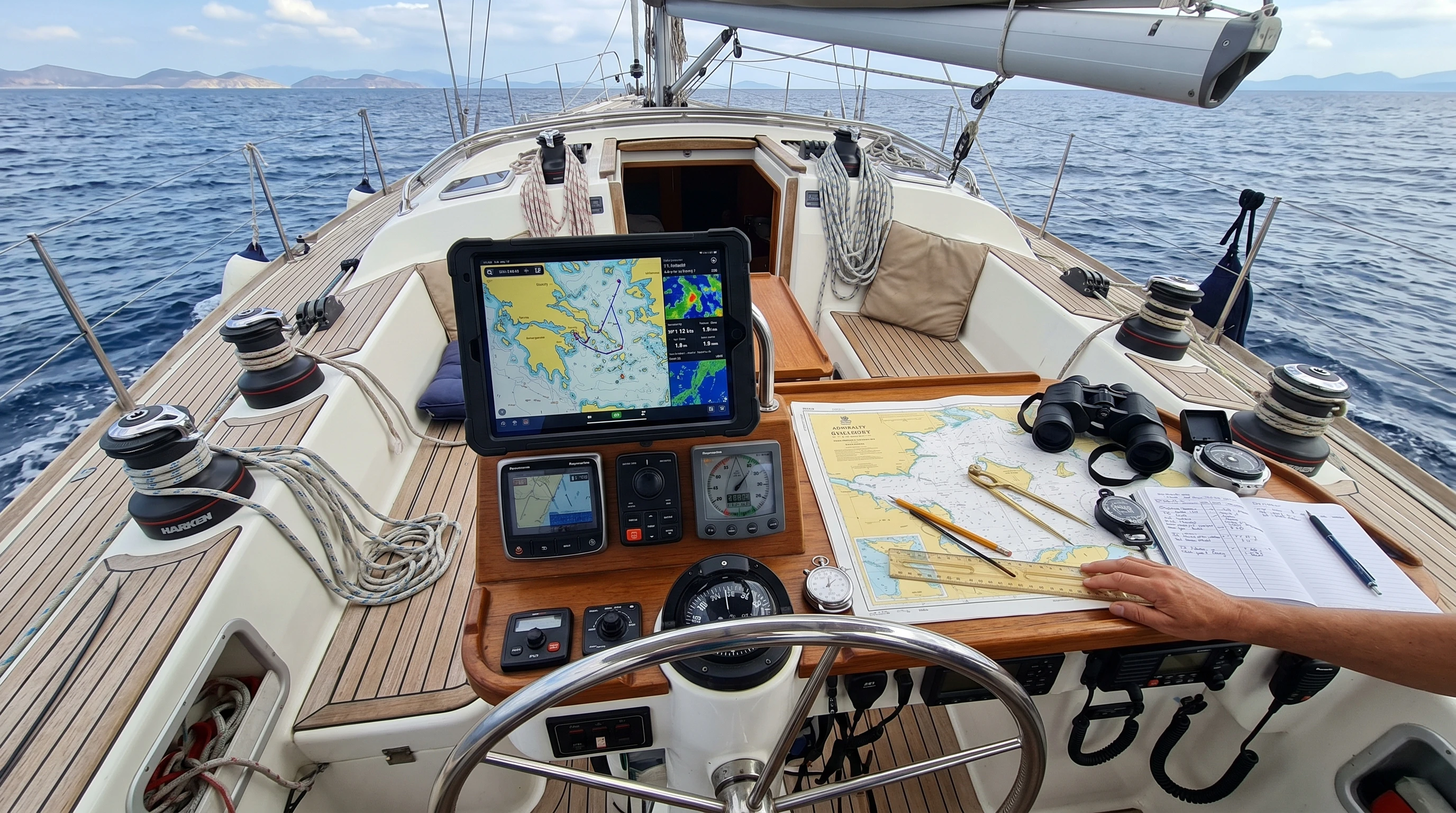
Sailing Software: Core Features You Really Need
Sailing navigation apps and route planners have changed the way I handle trip prep, daily tracking, and weather checks as I move from one anchorage to the next. Using sailing apps on real trips means I depend on them to keep the boat safe and make the ride smoother. These tools are no longer just for experienced skippers. New sailors can also benefit a lot from their user-friendly charts, live tracking, and weather integration.
Most sailing apps now offer an eye-catching toolkit that has become central to my pre-departure checks. Chart updates, live AIS (Automatic Identification System) information, and dynamic weather overlays are just a few reasons these apps feel indispensable. Many programs even let you sync devices, so data recorded on your smartphone can show up instantly on your tablet or chartplotter at the helm.
Top sailing software features to look for on every voyage:
- Chartplotter Integration: Live, vector-based, or raster nautical charts that stay current with regular online or offline sync.
- Route Planning & Creation: Easily build routes with drag and drop, check waypoints, distances, and estimated times of arrival (ETAs).
- Weather Overlays: Built-in forecasts, wind patterns, and sea state projections shown directly on your planned route.
- AIS Display & Tracking: Real-time positions of boats and info on nearby vessels for safer navigation, especially at night or in busy areas.
- Offline Functionality: Full charts and navigation features available offline, handy if the signal drops out at sea.
- Tide & Current Predictions: Integrated tidal data and current calculators help with passage planning and harbor approaches.
Some sailing software also allows personal note-taking on charts, which can be incredibly useful for logging local hazards or anchor spots you stumble upon along the way. Over time, I’ve come to count on these little features as much as the major ones.
What Makes the Best Sailing Software 2026 Worth Waiting For?
Sailing software coming in 2026 will likely double down on device integration and automation. I’ve noticed a push toward seamless connectivity that links your phone, tablet, and even onboard instruments. That could mean real-time sensor data right in your hand, more personalized safety alerts, or voice-controlled route adjustments for a hands-free experience.
A few trends and features that are gaining traction and should grow even more popular:
- Better Connectivity: Apps will make it easy to sync with chartplotters, autopilots, and onboard weather sensors via WiFi or Bluetooth for unified data and instant alerts.
- Auto-Updating Charts: No more downloads—charts update instantly as you enter new regions or zones.
- Predictive Analytics: AI-powered planning that suggests safer or faster routes, adjusting for wind shifts, traffic, and hazards as forecasts roll in.
- Augmented Reality Displays: Perhaps the biggest leap: see buoy markers, shallow areas, or approaching boats layered over live video from your device’s camera, making navigation more intuitive and visual than ever before.
Another potential addition is voice activation. Imagine plotting a course or pulling up the nearest marina just by asking your app, which is a game-changer when you need both hands on deck.
Top Sailing Apps for Route Planning
Sailing software for route planning lets us move beyond old-school hand-planning. With route-building features, I can set start and finish points, add drop waypoints, and see the estimated time and fuel consumption for each leg. This not only saves time but also makes real-time course changes effortless on your tablet or phone.
- Easy Route Adjustment: Move waypoints or edit route legs right on your device and recalculate your journey instantly, with any changes automatically factored in.
- Hazard Alerts: Visual warnings for rocks, shallow areas, and restricted waters pop up as you plan, helping you avoid surprises.
- Onboard Equipment Integration: Sync routes with your autopilot or export files compatible with existing hardware.
Additionally, many route planners now help with fuel management, estimating consumption based on distance and sea conditions, which is especially valuable for long passages or if you’re balancing between motoring and sailing.
Sailing Software for Marine Weather: Why It’s Super Important
Reliable weather updates are a huge reason I started using sailing apps. The best programs let you lay wind, waves, and barometric data right onto your route. Often, they pull from several forecast models, which allows you to compare and pick the one that matches up with local patterns from past experience. Seeing live fronts roll across the map helps you adjust plans in real time, often leading to safer, more enjoyable trips.
Key weather features to look for in any sailing software:
- Multiple Forecast Models: Apps should pull data from reputable sources like NOAA, ECMWF, and local meteorological services.
- Personalized Alerts: Don’t get caught off guard; custom notifications for wind shifts, storms, or heavy rain can be set along your route.
- Historical Weather Data: Some apps let you spot trends by offering wind and wave records from previous years, handy for planning longer passages.
Some apps also provide weather routing, letting you see several route options based on forecast conditions so you can pick the smoothest ride or the fastest passage. Even on short trips, these tools can help dodge rough patches or unfavorable winds.
Offline Mode and Data Sync: What to Know Before Heading Offshore
One vital feature to insist on is offline access. When I’m offshore or in remote anchorages, my phone signal often drops. A top sailing app will let you download all the needed charts, routes, and weather data before you go, so you’re never left without key info at sea.
This is also where automatic data sync shines. Once back in range, the app can upload logs, tracks, and notes, sharing updates with crew, friends, or family back home. Syncing devices to devices or to the cloud keeps everyone coordinated throughout the trip.
Offline Chart Access
Pre-downloading all essential charts and tidal data has saved me countless headaches. Most apps prompt you to save coverage areas for offline use, which is especially key before heading into unfamiliar or less-traveled waters.
Syncing Your Trip Data
Trip log and route syncing make it simple to share your adventure later, and automatically create a useful record for your next trip planning.
What to Consider Before Picking Any Sailing Navigation App
Choosing the best sailing software isn’t just about the specs—it’s about comfort and habit. Some apps focus on racing, while others are built for cruising or extended travel.
- Device Compatibility: Ensure your app runs smoothly across all your devices and syncs information easily between them.
- Chart Coverage: Always double-check if the regions you’ll be sailing are included or if there are extra chart fees.
- Learning Curve: Pick an interface that matches your comfort level with tech. Tutorials or in-app resources make digital navigation less intimidating for newcomers.
- Support Community: A supportive user forum or responsive developer support can save the day when you run into trouble while on the water.
- Pricing and Subscriptions: Compare start-up and annual costs, especially if you rely on frequent chart updates or bonus features like live AIS.
Another tip: consider apps that let you export or print your planned routes for emergency backup. While I enjoy using digital navigation, having a paper copy of my route is a simple best practice that can’t be beat, especially in the face of uncertainty at sea.
Additional Bells and Whistles in Modern Sailing Software
Looking ahead, the best sailing software will pack even more advanced features that are already popping up in the latest updates:
- Automatic Logbooks: Logbook tools keep a visual and written record of each day’s events, including conditions, performance, and even fun highlights.
- Anchor Watch and Alarms: Set a geofence around your anchor position and get instant alerts if your boat drifts too far.
- Community Marks: Drop custom marks for hazards, fishing spots, or marinas and share them quickly with friends or other users in the area.
- Safety Checklists: Built-in checklists make trip planning and management simple and organized for departures or overnight stops.
- Performance Analytics: Racing sailors can now track their tacks, compare their best times, and monitor sail trim for continuous improvement.
Recent versions are also leaning into social features. Some apps now let you join sailing groups, see real-time regatta positions, or even compete in virtual races from your living room when you can’t get out on the water.
Real-World Uses: How Sailing Apps Fit into Life On Board
- Cruising: Long-term and weekend cruisers turn to sailing software for passage making, anchorage searching, provisioning, and trip logs. These features help with weather planning, logbook automation, and staying safe with real-time AIS overlays and alert systems.
- Racing: Race captains rely on fast route building, up-to-date wind data, and performance tracking. Apps with trim analytics and tactical overlays give competitive sailors a measurable edge at the start line.
- Training: Beginners gain confidence with practice routes, step-by-step guidance, and interactive learning tools. Many apps now include virtual trainers, so you can rehearse race tactics or navigation skills before taking the helm for real.
I use these app features daily. Whether it’s planning the next anchorage after breakfast or checking the anchor watch before turning in, these tools make my sailing safer and let me relax a little more underway.
Frequently Asked Questions
What features should I always have in my sailing app?
Look for live charts, route planners, built-in weather, and AIS as must-haves. Extra perks like offline mode and anchor alarms can make day-to-day sailing smoother and safer.
How do I choose the right sailing software for me?
Try out a few good apps before picking one. I like to start with a free trial or demo to see if it aligns with my usual tech habits. User reviews, especially from sailors with your boating style, are super helpful for narrowing things down.
Is offline functionality really that important?
It absolutely matters. I often lose mobile signal offshore, so an app that works offline keeps me from ever feeling stuck or disconnected when the unexpected hits.
Can sailing apps replace paper charts and physical tools?
Sailing apps are fast, flexible, and powerful, but I still keep paper charts and a traditional compass for backup. No app can fully replace the peace of mind that comes from having analog navigation tools if the electronics fail.
Key Takeaways for Choosing Sailing Software
The most useful sailing software helps handle whatever the sea serves up, clear navigation, real-time weather, and reliable offline tools. Focus on features that suit the way you actually sail, not just the latest list of extras.
Whether you’re a seasoned skipper or brand new to digital navigation, using sailing apps for planning and weather checks can make each ride smoother. Go for software that feels easy, keeps you informed, and has the right mix of tools, and you’ll find yourself more at ease and able to enjoy the good moments out on the water.
This article was created with AI assistance and reviewed by a human editor.
About The Author




I don’t have much hands-on experience with sailing yet, but I’ve used GPS apps on land, and accuracy and ease of use always make the biggest difference for me. I imagine it’s even more critical when you’re out on the water.
Do you think beginner sailors should prioritize simpler software first, or is it better to learn on more advanced systems right away?
That’s a great way to look at it, if accuracy and ease of use matter on land, they’re absolutely critical on the water where conditions can change quickly.
For beginners, I’d strongly lean toward starting with simpler, more intuitive software. When you’re still getting used to navigation basics, like reading charts, understanding waypoints, and maintaining situational awareness, adding a complex interface can actually slow down learning and create unnecessary stress.
Simple systems help you build confidence and good habits first. Once those fundamentals are solid, transitioning to more advanced tools becomes much easier and far more meaningful, because you’ll actually understand what the extra features are doing and when to use them.
That said, it’s useful to gradually expose yourself to more advanced systems early on, just not rely on them right away. Think of it as layering your learning: master the basics, then expand.
In the end, the goal isn’t just to operate the software, it’s to stay aware, make good decisions, and navigate safely. The best tools are the ones you can use confidently under pressure.