If you spend time on the water, whether you’re a sailor, powerboater, or cruiser, the ActiveCaptain app is an incredibly useful tool to have on board.
I’ve found that it helps make trip planning, navigation, and sharing information with other boaters much easier. The app combines charts, hazard warnings, crowd-sourced reviews, and device connectivity features in one easy to use package. I’m going to walk you through what you can do with ActiveCaptain, how it works, and what stands out about this boating companion, so you can see if it’s the right fit for your next adventure.
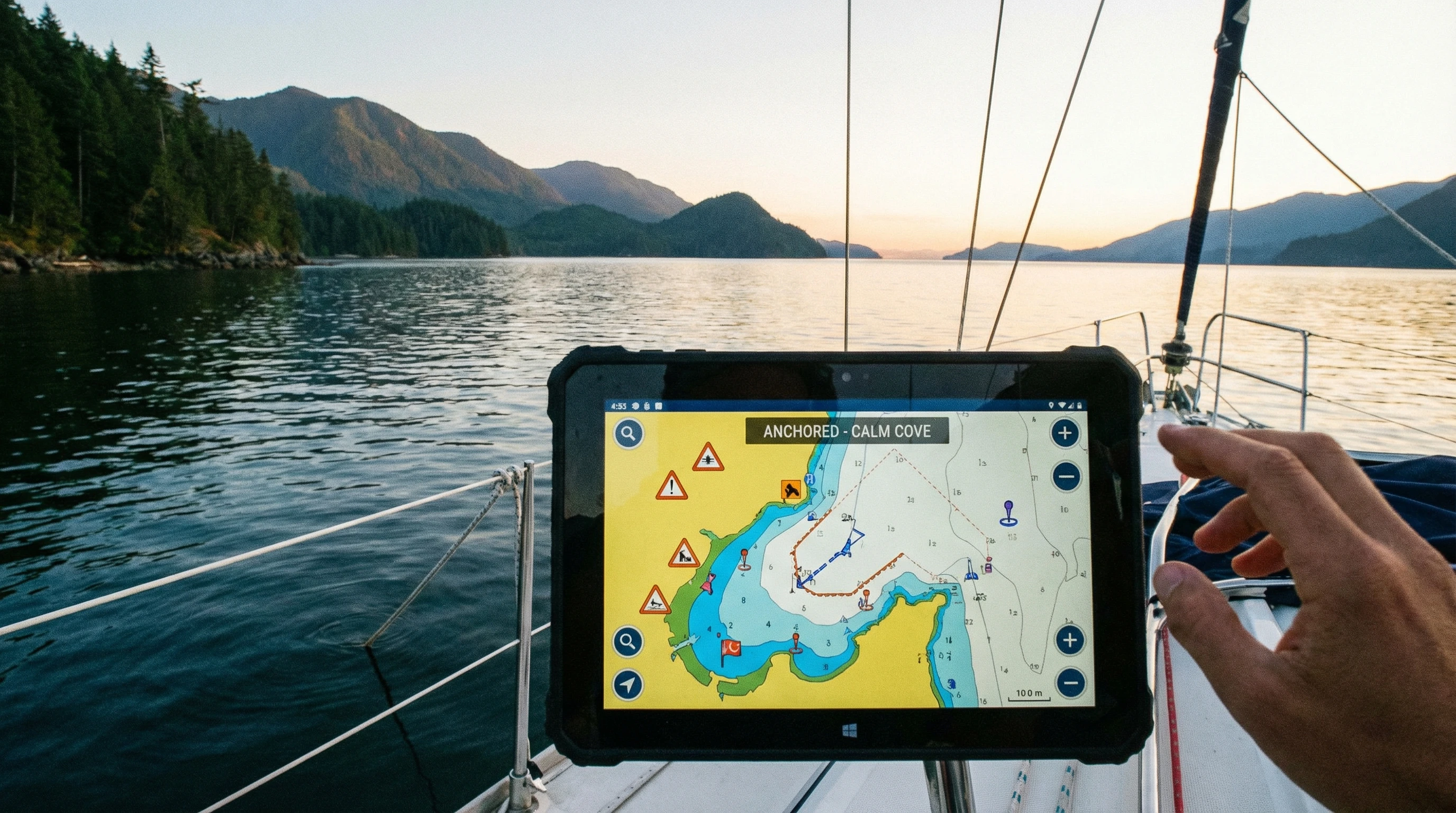
What Is the ActiveCaptain App?
The ActiveCaptain app is a free mobile application from Garmin that brings together essential information for anyone out on the water. You can access detailed charts, plan routes, check for current hazard notices, and read honest reviews from other users about marinas, anchorages, and local boating services. The app is available for both iOS and Android devices and works smoothly with compatible Garmin chartplotters and devices. My experience with this app feels a bit like having a full marine guidebook, navigation tool, and boating community right in my pocket, which is a real game changer during busy days on the water.
How to Use ActiveCaptain: Getting Started and Key Functions
Downloading the ActiveCaptain app is free from both the App Store and Google Play. Once I installed it, I set up an account with my email. Connecting my Garmin chartplotter was simple; I just followed the steps in the app and connected via WiFi. The app quickly identified my compatible device and let me sync maps, user data, and software updates, making device management straightforward and efficient.
Here’s what you can do once you’ve got the basics down:
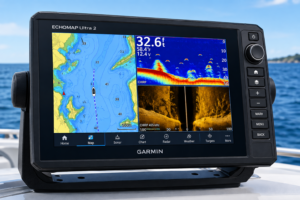
- View and interact with charts: I can scroll through high quality cartography from BlueChart g3 and LakeVü g3. The charts let me zoom in, mark waypoints, and plot routes from my phone or tablet, even before I leave the dock.
- Plan trips and routes: Route planning is a key feature I use often. I can draw my ideal lines, check distances, and save my plans to sync with my Garmin chartplotter later. Even when I want to try out alternative routes or compare distances between stops, the app makes this process easy and intuitive.
- Access hazard reports and local info: ActiveCaptain provides real time updates on hazards, restricted areas, and changing conditions thanks to crowd sourced input. Before heading to a new area, I check for any warnings or recent changes so I can plan accordingly.
- Sync with marine electronics: If you own a compatible Garmin device, syncing charts and user data makes managing your information much easier. Updates, chart purchases, and data sharing all take just a few taps, so information stays up to date across all devices.
ActiveCaptain Features for Sailors and Cruisers
The ActiveCaptain app has a multitude of features that I find especially valuable as a sailor. Whether I’m racing, coastal cruising, or just spending the weekend anchored out, these tools save time and increase my confidence on the water.
- Anchorages and marina reviews: I check ratings, comments, and photos for marinas or anchorages before I arrive. This really helps with finding protected spots and seeing what other sailors thought of the facilities or holding ground.
- User contributed local knowledge: Other boaters share tips about depths, mooring fields, hazards, and even nearby grocery stores or repair shops. I’ve stumbled upon great stops and dodged tricky shoals thanks to these updates.
- Automatic hazard alerts and notices: The app highlights user reported hazards, such as submerged objects or shifting sandbars, so I have extra confidence that nothing will catch me by surprise.
- Community forums: I use the built in ActiveCaptain Community feature to ask questions and connect with others planning similar routes. It’s a fast way to get answers or scout out travel partners, which can lead to new friendships and helpful advice.
Getting the Most Out of ActiveCaptain Community Features
The social features are where ActiveCaptain really shines. Here’s how I use the ActiveCaptain Community to get more from every trip and keep boating fun and safe:
- Review and rate places: After I anchor somewhere or use a marina, I’ll add my own review. Leaving practical tips and uploading clear photos helps others make better decisions, and I benefit from the same when reading their feedback.
- Discuss routes and conditions: You can ask the community about route options, tricky inlets, or facility status. Replies come from boaters who’ve often visited recently, so the advice is relevant and practical.
- Share tips and updates: If I notice shoaling, broken docks, or unusable services, it’s easy to submit an update. This keeps the community data current and helps everyone avoid surprises or unnecessary detours during their trips.
- Stay connected even offline: If you download charts ahead of time, you can use much of ActiveCaptain’s data and reviews even when you lose your internet connection offshore. Off grid convenience is a huge benefit for longer voyages or less trafficked anchorages.
ActiveCaptain Subscription Cost: Free vs Premium Features
There’s no cost to download or use the main features of the ActiveCaptain app. All the basic chart viewing, route planning, hazard reports, and community interaction is available for free after signing up for an account.
However, some premium mapping options, such as the most up to date BlueChart or LakeVü charts, do require a separate purchase through Garmin or your device maker. These are one time purchases rather than ongoing subscriptions. If you want to enable extra chart layers, like satellite imagery or some specialized content, you may need to buy specific charts in the Garmin system. Chart update prices can vary and often depend on which specific area or coverage you need.
Syncing with compatible Garmin chartplotters and using the full range of transfer and backup features does not require a paid subscription, which is good news for most casual sailors and boaters. This makes the app accessible and appealing for both newcomers and those with established tech setups.
Comparing ActiveCaptain vs Competitors
When thinking about marine navigation and trip planning apps, I’ve compared ActiveCaptain against others like Navionics Boating, iNavX, and Aqua Map.
- Navionics Boating: Navionics is extremely popular and offers similar chart plotting, real time weather overlays, and route planning. Its subscription fee is required for access to advanced features and ongoing chart updates. Navionics’ community reporting isn’t as rich or interactive as ActiveCaptain, though its charts are detailed and often preferred by some cruisers.
- iNavX: iNavX lets you install a variety of chart types, and some users like its ability to work with charts beyond just one brand. It supports GPS tracking and more manual route planning but lacks a true social community or wide spanning crowd sourced data updates.
- Aqua Map: Aqua Map covers similar ground as ActiveCaptain but relies partly on its own community and sometimes uses ActiveCaptain’s user contributed data. It offers good value on some chart bundles, but may lack seamless syncing with onboard hardware in the way ActiveCaptain does with Garmin devices.
My experience is that ActiveCaptain’s top strengths are its deep connection with Garmin hardware and its large, active community of real time reviews and alerts. That level of local detail and community sharing keeps it my primary boating app, even when I occasionally use others for specific maps or features. The combination of accurate data, interactive feedback, and hardware syncing creates a reliable and enjoyable user experience.
Common ActiveCaptain Troubleshooting Guide
From time to time, I run into small hiccups when using the ActiveCaptain app, especially when syncing with my Garmin chartplotter. Here’s how I address the most common problems that might come up for you too:
- Connection problems: If the app won’t connect with the chartplotter, I restart both devices and make sure they’re on the same WiFi network. Confirming that the firmware on the Garmin device is current sometimes solves sync issues and smooths the way for faster transfers.
- Chart updates not transferring: Sometimes, chart downloads or updates don’t finish. I double-check my internet connection and storage space on both phone and chartplotter to see if one is full or offline.
- App crashes or lag: Quitting and restarting the app usually works. Keeping the app updated to the latest version is really important; most issues get fixed in recent updates, so checking for updates regularly makes a big difference.
- User data or reviews not syncing: I’ve found waiting a few minutes helps. If that still fails, logging out and back in generally forces a fresh sync of community data and routes, which often solves the problem quickly.
Garmin’s official support center provides helpful articles and FAQs if you need step by step guides for setup or troubleshooting. Boat user forums and the ActiveCaptain Facebook group are also great sources when you want answers from other sailors or boaters who have worked through the same quirks and can offer practical advice.
Practical Tips for Using ActiveCaptain On Board
These habits have helped me get the most value out of the app during my own boating trips:
- Download chart areas before heading out where cell data may be unavailable, so you always have access to maps.
- Double check that the latest hazard notices are reviewed on your planned route before setting out.
- Regularly update and sync your app and Garmin device to ensure charts and software match, keeping data up to date for safety.
- Add your experience to reviews and hazards as you go, since everyone benefits from current info and local knowledge.
- Keep backup navigation tools available, just in case your phone or tablet runs out of charge mid trip and you need a reliable backup.
Real World Examples: How I Use ActiveCaptain During a Sailing Trip
One of my favorite uses for the ActiveCaptain app happened while coastal sailing in the Chesapeake Bay. I had planned to anchor in a creek that was well rated last season. By checking recent reviews, I found out boaters had just reported debris in the western cove and a broken dock piling. I chose a nearby anchorage instead, which another sailor had flagged as calm and easy to enter. A few miles later, I arrived at sunset and had a great, quiet night, thanks to the extra info and up to date feedback from other users.
I’ve also used the app at marinas to check fuel dock hours and send notes to friends heading my way. Posting my own review after a stay helps everyone else who might be considering the same stop later in the season. This active loop of sharing and learning makes each adventure better.
Frequently Asked Questions About ActiveCaptain
Here are answers to questions I see often from boaters new to ActiveCaptain:
Question: Is ActiveCaptain compatible with all chartplotters?
Answer: ActiveCaptain is designed to work with Garmin chartplotters that support WiFi connectivity. Double check if your specific model is supported in the device’s manual or on Garmin’s website.
Question: Can I use ActiveCaptain without a Garmin device?
Answer: Yes. You can use the app for chart viewing, trip planning, and community features without owning Garmin hardware. You’ll just miss out on hardware sync and a few advanced functions.
Question: Does ActiveCaptain cost anything to use?
Answer: The core app is free. You may need to purchase additional charts or pay for updates if you want premium or region specific cartography through the Garmin system.
Question: How often are hazard and marina reviews updated?
Answer: Reviews and hazard notices are updated constantly by active users. I’ve seen fresh info appear within hours after someone posts it from the scene, so the data stays current.
Question: Can I plan a full trip on my phone and send it to my chartplotter?
Answer: Yes. I do this by plotting my route in the app, saving it, and then syncing via WiFi to my Garmin device once I’m on board. This makes trip planning convenient and flexible.
Why I Keep Using ActiveCaptain for My Boating Trips
For any boater who wants up to date local knowledge, reliable trip planning, and a friendly boating community to lean on, ActiveCaptain offers a solid solution. I appreciate that it is free, easy to use, and packed with real life advice from people who spend time on the water. Its seamless connection with Garmin gear is an extra bonus for those with compatible devices.
ActiveCaptain fits nicely into both casual coastal sailing and multiday cruising plans. Thanks to consistent updates and feedback from thousands of boaters, I can rely on its charts and reviews to keep my trips safer and more enjoyable. Even as boating tech switches up, this app stays on my home screen whenever I have a new adventure in mind.
About The Author




I especially appreciated the section on ActiveCaptain’s community features, because that’s where the app truly seems to shine. The way boaters share real-time updates, reviews, and hazard alerts feels like having a helpful dock-neighbor with you wherever you sail. I love how you explained the value of user-generated tips about anchorages, grocery stops, and even shifting shoals those small insights can completely change a trip for the better. Do you think the community aspect is what most sets ActiveCaptain apart from competitors? And have you noticed certain regions where the contributions are especially active or detailed? Your breakdown of the app’s strengths makes it feel approachable, practical, and genuinely helpful for anyone planning their next on-water adventur
Thank you! I’m so glad that section resonated with you. Absolutely—the community aspect is really what sets ActiveCaptain apart. Those real-time updates and shared experiences turn the app into more than just a navigation tool; it feels like having a network of experienced boaters guiding you along the way. From what I’ve seen, contributions are especially active in popular cruising areas like the U.S. East Coast, the Bahamas, and parts of the Mediterranean, though there are gems of insights scattered everywhere. It’s amazing how even small tips—like a safe anchorage or local provisioning spot—can make a big difference on a trip.